
USB Drink Warmer with 4-port USB Hub
Keeps your coffee warm, powers USB devices, and tells the time.


-

-
-
-
-
-
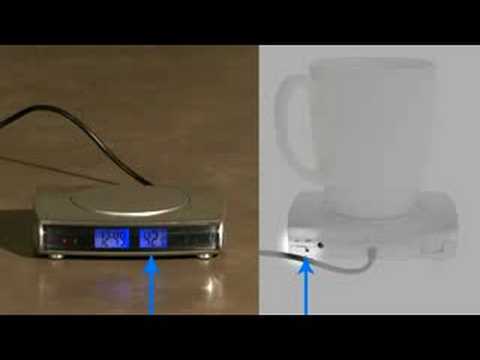 Watch video for: USB Drink Warmer w/ 4-port Hub


Overview
The USB Drink Warmer and 4-port USB hub is probably the most useful USB-powered device we've come across. Not only does it provide several useful functions, but it actually makes a ton of sense for it to be USB powered.
Many of us enjoy tasty beverages while working on a computer. The USB Drink Warmer will keep that drink warm! In addition to its drink warming abilities, the USB Drink Warmer also includes four USB 2.0 ports and a backlit LCD display which shows the temperature of the heating pad (in F or C) as well as the current time.
Features an on/off switch as well as an alarm.
Features & specs
- 4.5" wide x 4" deep x 1" thick
- Heating element has 2.75" diameter
- Heats from 122-140° F
- No software or drivers, just plug it into a USB port
- Four (4) USB 2.0 ports
- Displays temperature of heating element in F or C
- Backlit LCD display (can be switched off)
- Heating element can be switched on and off
- Clock with beep alarm
- 4 ft long cord
You may also like:


USB Drink Warmer keeps your coffee warmer, longer
The USB Drink Warmer and 4-port Hub is really hot right now. Literally, it's really hot. Not like scorching hot, but definitely toasty enough to keep even the most grandé coffee mug at a good temp.
Of course, with the USB Drink Warmer and 4-port Hub, you don't have to guess the temperature of the warming plate because it's displayed on the front of its backlit LCD screen.
Once fully heated, it keeps a temp between 122° and 140° F. In addition to being a great drink warmer, this device also functions as a USB 2.0 hub. There are two ports on each side of the warmer.

Tons more useful at work than those Successories posters
No, a large poster of an eagle soaring over a sunset with a caption that reads 'The calm at your core fuels the fire of ambition' is not going to keep your coffee warm.
So, you've sauntered into work on Monday at about 9:30am (the line at S'Bucks was a gazillion miles long) and just as you're about to log on to YouTube, your boss comes in barking questions like a maniac. You can't even manage a sip of your coffee before you must defend yourself. By the time His Highness has left, your coffee is tepid. Which is narsty. But, if you had purchased the USB Drink Warmer, you'd have coffee warmer than room temp. Dig it.

Please note that you must leave your mug on the USB coffee warmer in order to enjoy its heat-supplying properties.
Is it dangerous to possess this great power?
Asking if the heating aspect of the USB Drink Warmer is dangerous is akin to asking if a microwave is dangerous. No, unless you put your cat inside of it. Let's be sensible. We're dealing with heat and electricity here. So, if you like to work on your laptop in the bathtub, maybe you shouldn't connect the USB Drink Warmer. Just a thought.
For the detail-oriented (and those who missed it earlier... twice), the USB Drink Warmer's heating pad ranges from 122-140° Fahrenheit.
Plenty of switches and buttons for your inner micro-manager
The USB Drink Warmer and 4-port Hub couldn't be easier to use. Plug the cord into a USB port on your computer and enjoy how it keeps your drink warm. But, for those of us who like to fuss with things, the USB Drink Warmer doesn't disappoint.
The USB Drink Warmer features two on-off switches on the rear. One turns the heating element on and off and the other toggles the backlight on the display.
On the underside of the unit are several buttons for setting the clock (as well as the alarm) and toggling the temperature display between Fahrenheit and Centigrade. This is also where you'd find the battery compartment. The USB Drink Warmer uses a 1.5V button cell (AG13) which is included. The battery is used solely to store your clock settings.

Controls for the USB Drink Warmer are found on both the back and underside of the unit.
The USB Drinker Warmer is also a USB Hub!
Not only does this awesome little USB device keep your coffee warmer (or any drink, for that matter), but it's also a 4-port USB 2.0 hub. So, you don't have to dedicate a USB port on your computer in order to keep your drinks warm. You actually gain 4 more ports. Sweeet.
A side note: The more devices you plug into the hub, the more the temperature of the heating plate will be reduced. If you went to a Radio Shack and purchased a 5V DC adapter, you could plug that into the back of the USB Drink Warmer in order to avoid this issue. Of course, the temperature decline only occurs if the device you have plugged into the port doesn't have its own power supply.
Basically, the USB Drink Warmer converts the electricity it draws from your computer into heat. If you add a bunch of a peripherals that are also drawing electricity, the temp is going to fall. If this is still confusing, go back to flossing your cat's teeth.

The USB Drink Warmer has two USB 2.0 ports on each side of it.
Frequently Asked Questions about the USB Drink Warmer
1. Will the USB Drink Warmer actually keep my drink warm?
Answer: Most definitely. It gets quite toasty (122 - 144 degrees Fahrenheit).
2. Does the USB Drink Warmer have an on/off switch?
Answer: Yup. So, if you've plugged in your USB Drink Warmer and it's still not heating up, you should probably turn it on. (Hint: check the switch). It also has a switch for the backlight of the LCD display.
3. How long is the cord on the USB Drink Warmer?
Answer: It's 4ft. If that's not enough cord for you, you can purchase a USB extender.
4. Does the USB Drink Warmer work on all computers?
Answer: Yes, but only if your computer has a USB port. You can check to see if your computer has a USB port by noticing how many colors you can see on the screen. If you only have a black screen with green text, you definitely don't have a USB port.
![USB Cafe Pad will not work with an Apple ][](http://images.vat19.com/usb-cafe-pad/appleii.jpg)
If your computer looks anything like this, you probably don't have a USB port.
Where can I buy this awesomeness?
Burning Questions: You Ask, We Answer
Want to ask your own Burning Question?
This product is no longer available for purchase directly from Vat19. Therefore, we are no longer accepting new burning questions at this time. Sorry!
Please excuse the shameless cross promotions!

A simple, silicone beer holder for your shower.

A magnetic toy that defies gravity and turns magnetism into color.

Retro pocket synthesizer.

Liquid-free, reusable touchscreen display cleaner.

Synth-A-Sette Pocket Synthesizer
Carry a symphony of sound wherever you go!