
USB Beverage Cup Cooler and Warmer
Keep a beverage piping hot or cool as ice.


-

-
-
-
-
-
-
-
-
-
 Watch video for: USB Warmer and Cooler


Overview
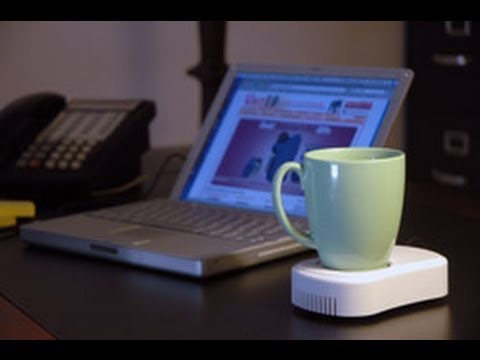
Plug this handy device into your computer's USB port and keep any beverage nice and toasty or cool as ice. Simply flip the switch on the back of the USB Beverage Cup Cooler and Warmer to alternate between heating and cooling.
What we love the most about this device is that it's pretty darned rugged, but still looks stylish. Some of the other USB warmers (and coolers) that we tested looked like they came out of a box of Cracker Jacks.
Features & specs
- 5.5" long x 3.25" wide x 1.25" high
- Approx. 3.5 foot long cable
- 2.5" diameter contact surface
- Works with any computer with a USB port
You may also like:


USB Beverage Cup Warmer & Cooler

The USB Beverage Cup Warmer & Cooler, as its name implies, does two things: it warms up a drink or cools it down. And it does this all while connected to a computer. Brilliant!
Lukewarm drink abandonment affects 62.6% of Americans*.
 Nobody likes tepid coffee, tepid soda, or even tepid bathwater.
Tepid = bad. Yet, we've all fallen victim to this merciless, unstoppable force. Who hasn't bought a cup of coffee only to have it go lukewarm fifteen minutes later? What about that ice-cold soda that's now room temp?
Fear the Tepid no more! The USB Beverage Cup Warmer & Cooler eradicates a problem that sends perfectly good drinks to an early demise.
*Lukewarm drink abandonment can only successfully be cured by AMA-certified LDA inhibitors.
The USB Warmer & Cooler safely eliminates tepid drinks
The USB Beverage Cup Warmer & Cooler will heat a drink up to about 120 to 140 degrees Fahrenheit. That's not hot enough to burn papers that may get tossed on top of it. You'd have to get it up to somewhere approximately in the close vicinity 451 degrees fahrenheit for paper to catch fire.
The USB Warmer & Cooler will cool a drink down to about 55 degrees. Of course, that is not cool enough for you to get your tongue stuck to the device, so go ahead and take those triple dog dares.
;) Top view. | ;) Side view. |
;) Rear view. Flick the switch to activate heating or cooling. |
This product could save your marriage
Yes, that's a bold statement. In fact, it's bold and orange. Here's the point: With the flick of a switch, you can go from heating a beverage to cooling a beverage. This can have serious impact on your life.
Imagine the following scenario: Your spouse yells, "Honey, the neighbor's cat is scratching little Johnny's leg!" You grab a piping hot cup of coffee off your USB Beverage Cup Warmer & Cooler and toss it on Mr. Jinx. He runs away, a little shocked, but not injured. This is good, but not spectacular. Your son has sustained a few nasty scrapes.
So, you grab a bottle of water (which you smartly put on the USB Beverage Cup Warmer & Cooler after grabbing the cat-dousing hot cup of joe) and rinse out those scrapes. Your son is feeling better, your spouse is reminded why they married you, and Mr. Jinx will have a nice coffee surprise the next time he licks himself clean. Everyone's happy!
;) | ;) |
Keep your soda cool and refreshing. | The USB Beverage Cup Warmer and Cooler will keep your $18 Starbucks beverage at the perfect temperature. |
Instruction manual is only necessary as entertainment
The instruction manual for the USB Beverage Cup Warmer & Cooler features some awesome Chinese-to-English translations. Here are a few of the gems:
- "request the cup can transmit heat" - We think this means that the warmer only works if the cup that you put onto it can transmit heat. So, don't put a Thermos on there...it may not work too well.
- "Put the products in the steady place after taken it from the packing."
- "Put the cup on the working position. Now you may enjoy your life!"
The reason why we're making fun of the instructions is because this device is so easy to use, you don't really need instructions. But, we applaud the manufacturer for putting in the effort and giving us a little chuckle.
Questions about the USB Beverage Cup Warmer & Cooler
1. Will it actually keep my drink warm?
Answer: Yes, it gets up to about 120-140 degrees Fahrenheit. Our USB Drink Warmer with 4-port hub may get a little warmer.
2. Does the USB Beverage Cup Warmer & Cooler actually keep a drink cool?
Answer: Definitely. It basically has a heat exchanger inside of it (which includes a little fan). That's why it's a little thicker than the USB Drink Warmer with 4-port hub and it has a series of vents in the front. This allows the air flow that is necessary to cool down the plate that you put your drink on top of. So, it's kind of like a small air conditioner that doesn't require changing filters. Just plug it into a powered USB port and you're all set.
3. How long is the cord?
Answer: It's 42 inches long (3.5 feet). You can buy a USB extension cable if that isn't long enough. In all, the USB Warmer & Cooler weighs a little less than 1 lb.
4. Will the USB Beverage Cup Warmer & Cooler work on my computer?
Answer: Yes, but only if your computer has a USB port. If your keyboard looks anything like what you see below, you have a Commodore 64 and it's actually 1987 right now. The Internet doesn't exist and this web page hasn't been made yet. Poof!
![USB Cafe Pad will not work with an Apple ][](http://images.vat19.com/usb-warmer-cooler/c64keyboard.jpg)
If your keyboard looks anything like this, you probably don't have a USB port.
Where can I buy this awesomeness?
Burning Questions: You Ask, We Answer
Want to ask your own Burning Question?
This product is no longer available for purchase directly from Vat19. Therefore, we are no longer accepting new burning questions at this time. Sorry!
Please excuse the shameless cross promotions!

Ballpoint pens realistically styled like hardware.

The cutest way to tidy up your desk.

An electric drawing pen that lets you create dot-based artwork.

A rotating party light powered by USB.

Synth-A-Sette Pocket Synthesizer
Carry a symphony of sound wherever you go!